Why this matters for component suppliers
A component supplier sells inputs that another business uses to make, repair, package, or maintain something else. That can include electronic parts, fasteners, ingredients, packaging materials, industrial consumables, or other production-critical items. A supplier is different from a general wholesaler because the buyer often depends on the part for an active job, production run, maintenance window, or customer commitment. When supply is tight, the question is not only whether inventory exists. It is whether this account is allowed to buy it, in this quantity, at this moment.
That nuance is easy to lose in ecommerce. A product page may show available stock, while the ERP, sales team, or allocation planner knows that the same stock is reserved for strategic accounts, open contracts, warranty support, or scheduled production programs. If the portal accepts the order first and explains the allocation rule later, the supplier creates a service issue it could have prevented.
The specific issue: invisible allocation logic
Allocation rules usually start as a reasonable operational control. Scarce components are divided by account tier, contract, forecast, region, customer program, or replacement-part priority. The problem is that these rules are often handled outside the ecommerce experience: in spreadsheets, salesperson memory, ERP notes, manual order review, or post-order customer service emails.
That creates three common failures: buyers over-order because the site does not show their usable allocation; buyers under-trust the portal because confirmed carts later get reduced; and internal teams spend time explaining decisions that should have been visible before checkout.
What to show before checkout
Component suppliers do not need to expose every internal allocation formula. They do need to give buyers enough context to place a realistic order.
- Account-eligible quantity: the quantity this buyer can purchase now, separate from total on-hand stock.
- Allocation reason: a short label such as contract reserve, constrained supply, forecast-controlled item, or service-priority inventory.
- Next review path: whether the buyer can request an exception, request a quote, split the order, or accept a later ship date.
- Line-level handling: clear behavior when only part of a cart line exceeds allocation.
- Expiration timing: when the allocation view may refresh or when a reserved quantity will be released.
A practical commerce pattern
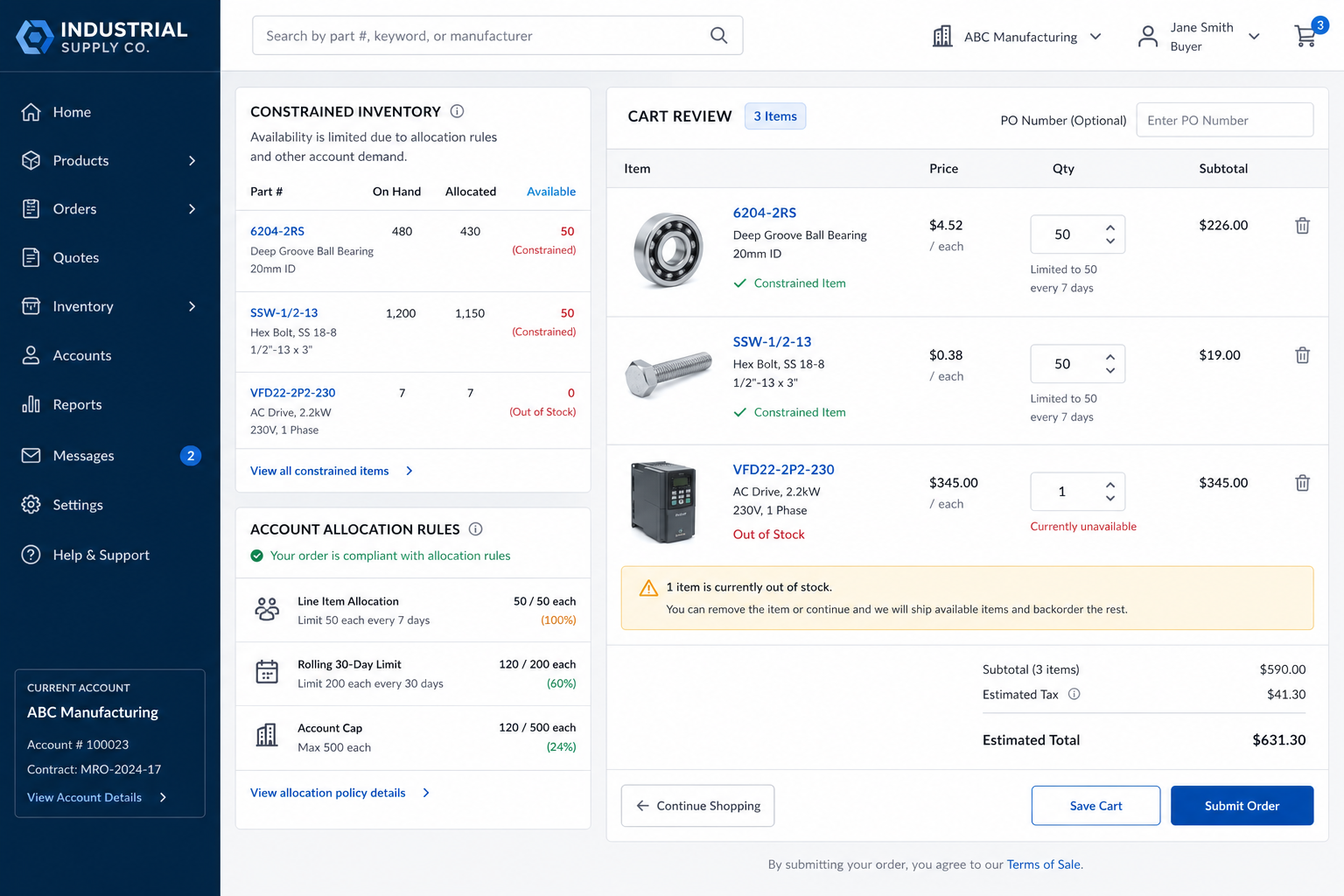
A strong pattern is to treat allocation as a pre-cart and cart-validation service, not as a back-office correction. The product page can show normal availability language, but the cart should call a rules layer that evaluates account, location, SKU, quantity, contract, forecast period, and priority status before the buyer submits the order.
For constrained items, the cart should separate three outcomes: approved quantity, exception-request quantity, and unavailable quantity. That keeps the buyer moving without pretending every line is equally orderable. It also gives sales and operations a cleaner exception queue because the request arrives with the right account, SKU, allocation rule, requested quantity, and business reason.
Implementation checklist
Define the source of truth for allocation: ERP, planning system, inventory service, or a governed rules service.
- Store allocation outcomes separately from raw inventory so buyers do not confuse on-hand stock with buyable stock.
- Use reason codes that customer service, sales, and buyers can all understand.
- Create an exception record before checkout when buyers request more than their current allocation.
- Measure allocation edits, exception acceptance rate, order cuts, and post-order service contacts by SKU and account segment.
FAQ
Should suppliers hide constrained SKUs from buyers?
Usually no. Hiding the SKU can create more confusion, especially if buyers know the item exists from a contract, catalog, prior order, or bill of materials. It is usually better to show the item with clear eligible quantity and an exception path.
Is this the same as a minimum order quantity rule?
No. MOQ rules tell buyers the minimum or increment needed to place an efficient order. Allocation rules tell buyers how much scarce inventory they are allowed to buy. A supplier may need both, but they solve different problems.